Home Blog Page 440

5 Upcoming Pakistan Movies You Should Must Watch, 2017

0
movies

Within past few years, the standard of Pakistani movies has gone as high as that of Bollywood movies. Now Pakistani filmmakers spend lots of money on making quality movies. They often go to different countries along with their crew for shooting and finally the outcome is worth watching. With the increase in standard of Pakistani movies, the audience has also increased. Many people left watching Pakistani movies due to their low standard but now they are returning back. Just like every year, surely this year the Pakistani film watchers are also waiting for upcoming great movies so here are top 5 upcoming Pakistani movies that we would suggest everyone to watch this year.

Verna

It’s an Urdu socio-drama film in which beautiful Pakistani film/drama actress Mahira Khan will be playing a leading role. This film is written, directed and produced by Shoaib Mansoor and will be released on this Eid-ul-Fitr.

movies

Yalghaar

This is an Urdu war epic film based on a real story of Operation in Swat by Pakistan Army. It is one of the most awaited movies this year in which Shaan Shahid, Humayun Saeed, Ayesha Omer, Umair Jaswal and Sana Bucha are playing lead roles with other actors. This movie will be released this year on Eid ul Fitr.

movies

Arth 2

This film is a remake of film “Arth” by Mahesh Bhatt that was released in 1982. This is a romantic drama type film in which Shaan Shahid, Uzma Hassan, Mohib Mirza and Humaima Malik are playing lead roles. The final release date of this movie is not yet decided but it will be released this year.

movies

Firasat

This is a Pashto thriller and action film in which Atta Shah Hoti, Parveen and Khursheed Khan will be playing lead roles. It is written by K.Khan while directed and produced by Atta Shah Hoti.This film will also be released this Eid-ul-fitr on 25 June, 2017.

movies

Jhol

This movie is an action and comedy movie in which Urwa Hocane, Ali Azmat, Babra Sharif and Mustafa Qureshi will be playing lead roles along with other co-actors. Directed by Shahid Shafaat and produced by Hamza Ansari and Hassan Azhar, this movie will be released this year and is really worth watching.

movies


How to Unroot Android Devices – Third Party Apps

0
Unroot Android

Unroot Android; it is not a good step you want to take because rooted android handset gives you full control of using all the apps you wanted to use. But, if you think that there is no more need of rooting in your handset then there are many easy ways for revoking root privileges from your device.

See Also: How to Root Your Android Phone – KingRoot

Let us list some of the prominent and easiest ways of revoking root privileges from your android handset:

Un-rooting can be done manually, but it’s not safe. Moreover, you can un-root your devices using third party apps. Third party apps make it easy for you to un-root your devices more safely and accurately. Here are some of the third party apps used for un-rooting devices.

  1. Universal Un-rooting App
  2. SuperSu Un-rooting App

Universal Un-rooting app is one of the most preferred apps used for un-rooting the rooted devices. It is easy to install and easy to use. Once you have launched the app from the app store, you just have to open it.

Unroot Android

Moreover, the app is a self-explanatory app which allows its users to unroot their devices step by step. Furthermore, it’s kind of a guiding app which guides for safe un-rooting. After unrooting your device will reboot automatically. Finally, check the unroot via root checker.

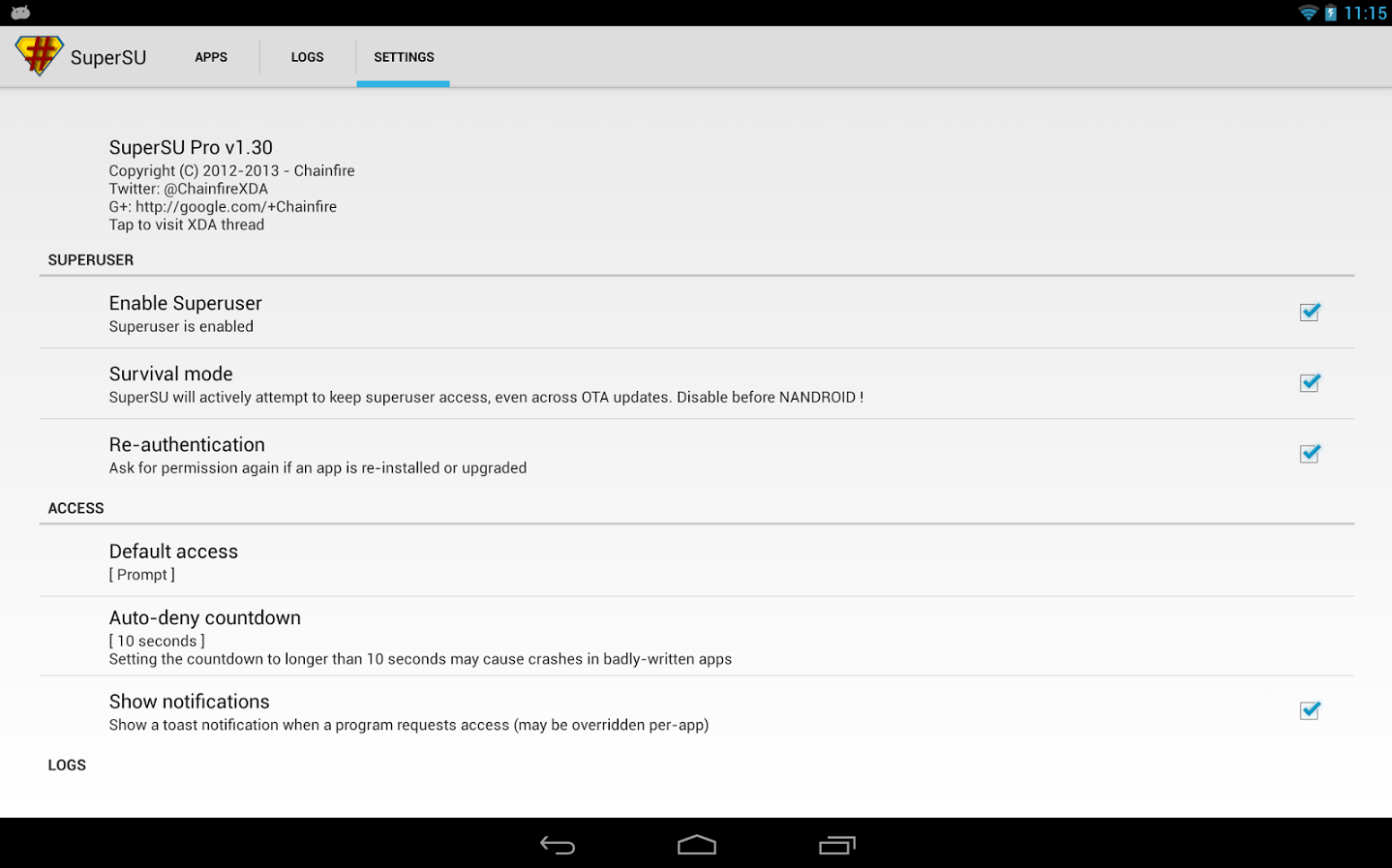
SuperSu Un-rooting app is another app used for un-rooting devices safely. The SuperSu works same as the Universal un-rooting app. You have to download the app and open it.
Now you’ll see a list of various actions which can be done through this app.

Unroot Android• Tap on the Settings bar.
• Now, you will see a list, you have to scroll down, there you will see the Full unroot option.
• Tap on the Full unroot option for unrooting the device.
• After taping the option you’ll be prompted to unrooting process. And you have to continue it.
• Now, the app will be closed automatically.
• Now reboot your device.
• After rebooting your device confirm the un-rooting through root checker.

Easy Steps For Your Facebook Account Privacy

0

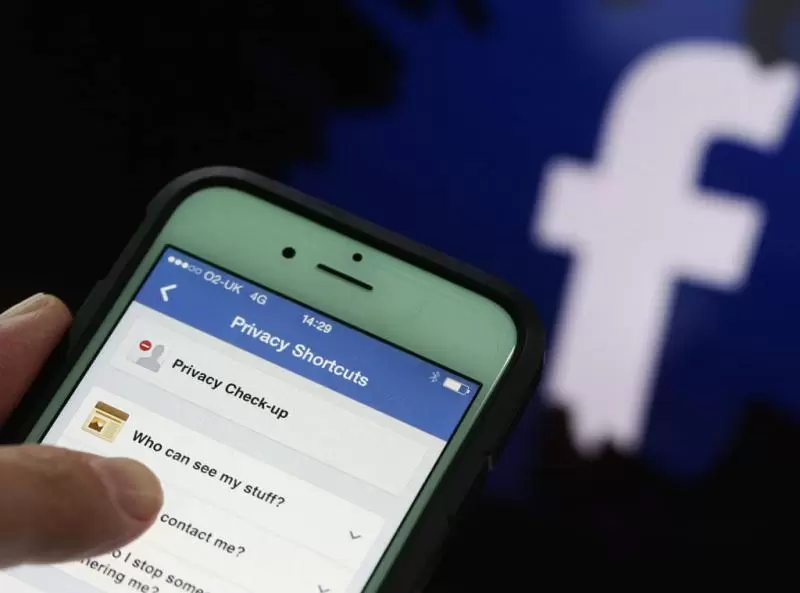
There are very easy steps which you can follow to customize the privacy setting of your Facebook account. Whatever you are sharing either your pictures, posts related to your hang out or lunch might not be desired to be seen publicly. If you are expected to have post shared for limited people or for single one, everything is possible by going through simple steps.

Limit Your Viewers

First of all view your account as other see it then you will get to know what changes you need.  To view your account as others view it, sign into your account, choose the gear icon in the top-right corner, click Privacy Settings, and select Timeline and Tagging in the left pane.

After that click View As to the right of “Review what other people see on your timeline” in the “Who can see things on my timeline?” section. Now you can have a look at your timeline as public see it.

The public will see only your profile and cover photos if you have given limited people access to your account. There is an option for such setting (which you can limit to friends of friends) even the people you’re following, and the groups you belong to. If you want to view your profile as a particular person then you should click View as Specific Person at the top of the window and enter the person’s name so you will see the profile as he/she sees it.

If you want to change viewers of your timeline then from your Timeline move to Tagging settings and click Edit to the right of “Who can see posts you’ve been tagged in on your timeline?” and “Who can see what others post on your timeline?” There you go with your selection for each one that is including option for your ease.

facebook facebook

Make your Browsing secure

If you want to ensure a secure connection then click Security in the left pane of Facebook’s Account Settings and make sure Secure Browsing is enabled.

Another option will allows you to turn on log-in notifications and approvals, and view and edit your recognized devices and active sessions. A device can be easily removed just by clicking Edit to the right and Remove next to the device’s entry. In addition to quit all active Facebook sessions, click Edit to the right of Active Sessions and choose End Activity or End All Activity accordingly.

Limit the access to your stuff

Facebook posts belonging to your past and one’s for future both can be restricted as you wish. For restricting access to your past and future Facebook posts, click Privacy in the left pane of the Account Settings. Here are the options to Limit Past Posts under “Who can see my posts?” and Edit to the right of “Who can see your future posts?” in the same section.

Moreover you can limit friends’ requests too by selecting the option under “Who can contact me?” Also it let you filter the messages you receive. For being more secured there is one more option who can look you up by e-mail address and phone number, who can look up your timeline by name, and whether your timeline will link to search engines.

Stop From Tagging and Reviewing

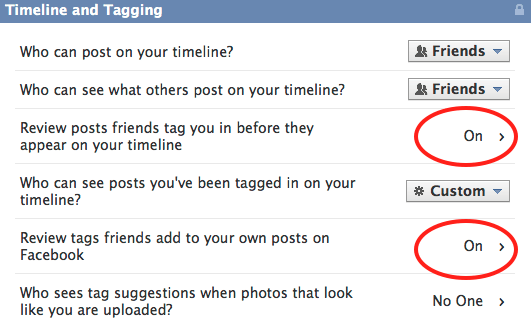
Well, after restricting from who can see post more deep you can go by stopping your friends from tagging and reviewing. You can also block friends from adding to your timeline and review photos someone attempts to tag you in through the Timeline and Tagging Settings. There you can find “Who can post to my timeline?” under “Who can add things to my timeline?” with options Friends and Only Me. Post is appearing on your timeline and for review of that posts you tagged in before, click Edit to the right of the entry and select Enable.

“How can I manage tags people add and tagging suggestions?” in this option it let you to review tags people add to your own posts before they appear.

Do not Allow Apps Access:

Facebook app permissions can be checked by clicking Apps in the left pane of the Account Settings window, choose Edit to the right of the app’s entry, and then change the app’s visibility and also you can click “Remove app” at the bottom of the entry respectively. You can also click “Report app” to let Facebook know the app is spam, inappropriate, or requesting too much information, or to contact the developer to report a bug or abusive content, or for another reason. These options are worth noticing because do not allow apps to get access to your personal information or to your friends’ information.


How to Transfer Contacts from Android to Android Phone

0
Transfer Contacts

The first most problem faced after changing your android phone is your important contacts and there saving. Whenever you switch to a new phone you need to save all the contacts in your new phone. Transfer Contacts

Transfer Contacts from Android to Android Phone

Most of us don’t know about the transferring procedure of the android handsets. Moreover, wasting your precious time on saving your contacts one by one is not the best solution.

However, transferring contacts is easier than you think it is. There are two prevalent ways used by most of the people for transferring their contacts from an android to another android.

Transferring your contacts via Bluetooth and Wi-Fi

To move contacts from Android to Android via Bluetooth is the easiest method of transferring contacts. First of all, you have to make sure that Bluetooth is on and visible on both the Android Devices.

Furthermore, via Wi-Fi Direct you can also copy contacts from Android to Android, the same procedure applies for this…. Yes….! Please make sure that Wi-Fi Direct is enabled on both the Android devices.

Let us learn the procedure step by step

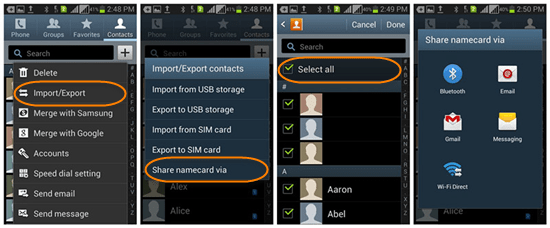
  1. First of all open the Contacts app on your Android device
  2. Tap on the Menu button at the bottom-left
  3. Now tap on “Import/Export” > “Share name card via”, then select the contacts you want to transfer. Finally, you can tap on “Select all” to transfer all your contacts.
  4. Now there are two options for transferring the contacts
    Via Bluetooth: Now tap on “Bluetooth” and select the device to which you want to send the contacts. Then on the receiving device, accept the Bluetooth authorization request. You are done…!
    Via Wi-Fi Direct: Tap on “Wi-Fi Direct” and select the device to which you want to copy the contacts. Then on the receiving device, grant the permission for Wi-Fi Direct connection. That’s it….!

Transfer Contacts

Transferring your contacts via third party app

Furthermore, there is another option for you for transferring contacts via third party app i.e. Jihosoft Android Contact Transfer is one of the most prevalent choices made by mobile users. You can use this app for contact transfer.

Transfer Contacts

5 Simple and Easy tips to protect Hairs in Summer

0

Summer heat is annoying you we know because it is affecting your skin and hairs both. It is everyone’s main area of concern nowadays to manage hairs and protect them from heat. What will be easy and simple ways to protect hair from heat during this hot summer season that is frequently asked question. So we have decided to give you 5 simple handy tricks for your hair care in summer.

These simple ways will surely help you out because we have jot down these points in the light of hair expert advices.

  1. Do not Wash Hairs Frequently

As we all feel increase in production of oil on scalp during summer. We sweat more that makes oily scalp which consequently gives a greasy and oily texture to hair. We frequently feel a need of hair wash and thus people wash hairs more often. But it is not good for hairs because more wash incites production of oil. It should not be washed frequently rather try cotton ball in your hairs to absorb excess oil.

  1. Avoid direct contact with sunlight

It is better to cover your head once you come out and having a direct contact with sun rays, because sun rays damage your hairs badly. If you cover your head with cap or scarf that will maintain scalp moisture as well and protect from dangerous ultra violet rays of sun.

  1. Try Gentle Hair Styles

During whole summer season, try to make loose braids and gentle hair styles. Instead of tightly tie hairs upward, you can make messy braids and pony tails.

  1. Give Oil Massage regularly

Use coconut or olive oil for massaging your hairs in this season. For giving a good care it is important to massage your hairs properly. Proper way for massaging hairs is start from roots to end with a gentle rub. Use good conditioner after wash that will give your hairs good moisture but not greasy look.

  1. Prefer Wide Comb

Rather than using hair brush, use wide tooth comb for your hairs protection. Comb is more gentle and easy for your hairs especially when they are wet. When your hairs are greasy and oily because of more sweating do not try brush in your hairs because it will pull and break them. It will damage and harm your hairs.

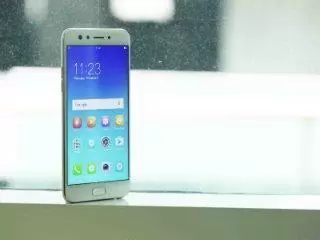
Oppo Introduced F3 Selfie Camera Phone

0

We got an addition to the Selfie camera phones by Oppo after introducing F3 model. This phone is supposedly a sister mobile of F3 plus which was launched earlier. It has very similar design and look to its sibling but apparently smaller one. It is economically affordable set rather than F3 plus. Lets have a closer view of this newly launched phone specifications and features.

A dual selfie camera of F3 encompass16-megapixel 1.3-inch sensor with f/2.0 aperture,more over 8 mega pixel double view wide-angle camera . It sports a 120-degree wide-angle lens best for grand selfie because 105-degree field view is possible.A plus feature of Smart facial recognition which auto select a lens that goes perfectly ideal. Also users can select desired lens accordingly. Other camera features of F3 include the Beautify 4.0 app, Selfie Panorama, Screen Flash, and Palm Shutter.

A fingerprint sensor on the home button purposed to unlock the smartphone within 0.2 seconds is set in this model. Oppo F3 houses ColorOS 3.0 based on Android 6.0 Marshmallow. It is also dual sim (Nano sim) android phone.A worth discussing feature is Clone Apps which is aimed to provide users a facility of using two WhatsApp accounts on the smartphone at a time. F3 possess a 5.5-inch full-HD (1080×1920 pixels) In-Cell TFT 2.5D curved display with Corning Gorilla Glass 5 protection and 401ppi pixel density. It is powered by a 1.5GHz MediaTek MT6750T6 octa-core SoC coupled with with Mali-T860 GPU and 4GB of RAM.

Well if we talk about battery, it has good house power that packs 320mAh battery. Addition to this it has 64GB of built in memory that can be increased through microSD card (up to 128GB). F3 comes with triple-slot tray, allows two SIM cards and one microSD card at the same time. The Oppo F3 Plus sports a 13-megapixel 1.3-inch sensor with PDAF, and LED flash at rear side.

Atlas Honda 150cc Motorcycle Launched in Pakistan

0
Honda 150cc

After ruling on the motorcycle market in Pakistan for decades, Atlas Honda has launched its new motorcycle. People are already using its successful models in the category of 70cc, 125cc and a fast emerging 100cc bike. Moreover, Atlas Honda Ltd. has recently launched a new elegantly designed and fancy looking Honda 150cc motorcycle to cater to the higher end segment.

Atlas Honda 150cc Motorcycle Launched in Pakistan

The new self-start Honda 150cc motorbike based on most recent innovation not just gives a steadier ride and best efficiency in its class additionally gives remarkable safety and security components to fit prerequisites of Pakistani clients, the organization expressed in an official statement on Wednesday.

Honda 150cc

Let’s list its salient features:

  • CB150F inherent Turbo Engine Technology
  • ASV & ACV used for best engine performance
  • High Performance Self Start System using multiple roller bearings and spark-less brushes
  • 5-speed constant mesh
  • Noncyclic Transmission for smooth gear shift
  • Maintenance Free powerful backup battery
  • Die casted “Z Section Spokes” alloy rims best suited for Pakistani roads

Honda 150cc

Moreover, the bike is packed with a number of safety features that cater to local needs. The magnetic ignition protection ensures use of only the original key to operate bike. So, this feature makes your bike’s security system more safe than usual.

Furthermore, it is geared up with:

  • Front disc brake
  • Car type speedometer visibility
  • Strong tail protection
  • Protective chain guide system ensures a great riding experience with peace of mind

Honda 150cc

According to press report:

Afaq Ahmed GM Plants Atlas Honda said,

The annual capacity of Atlas Honda plants after the expansion is 1.35 million units per annum and production figures of last year were 920,640 units. Talking about their plans for the export of this and other models, he said that they are already exporting some existing models to Afghanistan and Bangladesh.

Furthermore he said, “We have a dedicated department that keeps on looking for opportunities for exports. We are looking forward towards that aspect as well. We exported 6456 units in 2015-16 and 7321 units in 2016-17,” he added.

“Atlas Honda has always pioneered the efforts to bring technology and employment to the country as a part of Atlas Group’s philosophy. Our claim is amply supported with localization of complex components like clutch, CDI unit, Regulator Rectifier, Ignition coil and many others,” Afaq highlighted.

Price of CB 150F is Rs 159, 000.

Students of NUST Win NASA Space Apps Challenge Islamabad 2017 and get Nominated for Global Award

4

NASA Space Apps Challenge is an international hackathon that occurs over 48 hours in cities around the world. NASA encourages a global community to share ideas and engage with open data to address real-world problems, on Earth and in space. Participants can work alone or with a team to solve challenges that could help change the world. It’s not just about apps! It rather encourages students and professionals a like to tackle a challenge using robotics, data visualisation, hardware, design and many other specialities! This year NASA Space apps competition was a global event where people from around 70 countries participated.

IGIS, NUST hosted the Islamabad chapter of this event, where participants from various departments of NUST, Bahria, Air and FAST – NUCES, IST and Karachi University were a part of the event.

A team of students from NUST (IGIS) made their way to the top by securing first place in the competition. Team ‘ We are VR ‘ competed in the category of ‘ 1D, 2D, 3D – GO!’ by accepting the challenge of creating tools that visualize Earth Science mission and their data in three dimensions. Team ‘ We are VR’ was led by Fareed-ud-din Masood with its other two members Waleed Amir and Saadoon Hammad.

Team ‘We are VR’

VR+ is a tool created to develop an interactive VR tour of 3D models downloaded from the NASA data repository. lt includes features of both indoor and outdoor navigation of 3D models available on multiple platforms such as android, desktop and web. It was a commendable team effort which bore fruit and students from National University of Science and Technology ( NUST) made their mark yet another time by winning the global nomination. Adding another feather to the cap the second place was also secured by another team ‘ Spatial Geeks’ from the department of IGIS, NUST.

Team ‘Spatial Geeks’ secured second position in the event

Latest Article

Mobile Packages